AEO Checker
TL;DR
I built and open-sourced AEO Checker, a checker for the things that stop AI assistants reading your website, quoting it, or buying from it. It has 53 rules, based on some incredible Twitter threads I’ve linked below, and can run on every commit. I ran it on one of my own projects and the home page scored 27 out of 100. It works well.
The info this is based on
A friend sent me 28 posts he’d bookmarked on X about AEO, or answer engine optimisation. This is roughly SEO for AI chatbots and agents. The core idea is that you make your site readable enough that agents can understand it and take action. This is important: in the next few years, over 10% of all online purchases are going to be made through AI. You can read more about this in my friend Larne’s article on the problem and opportunity of AEO, linked below.
Some of the advice in these tweets was useful. Write sections that make sense when quoted on their own. Check you aren’t blocking the crawlers you want visiting. Give pages specific titles. Put information somewhere an assistant can read it.
All I’ve done is take these ideas and turn them into code. You can paste the repo link into your AI agent, and it will run through the checks step by step.
I build a lot of small websites, so a list of things I ought to remember before every deploy has obvious limitations. I wanted something that would look at the project and tell me what I’d missed.
Most websites are not designed for agents
In Larne’s piece, he asked four AI assistants to book one night at a small hotel, direct. Only one managed it. The other three couldn’t see a live price, guessed, and told the guest to phone. This is obviously a problem. As a lazy consumer, I’m probably just going to ask the agent to book the hotel it can use.
One of the problems was the main “Book Now” buttons. These were blank links: something a person could click without thinking, but an agent reading the page couldn’t identify.
These are small fixes: give the button a label, put the price in text and make the booking link readable. Often, you can make these changes without changing how the site looks to a person using it.
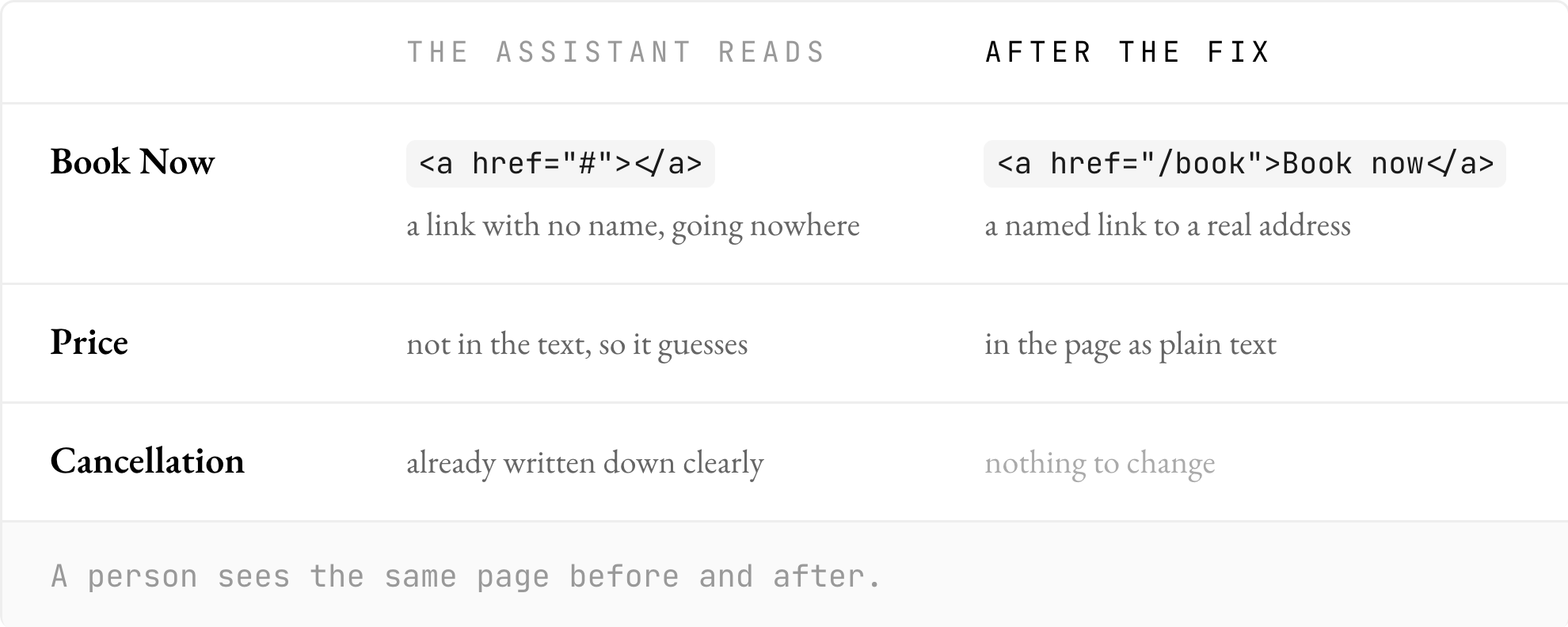
Fig. 1 — What the assistant reads, before and after the fix
That pushed me to build the checker properly, including the things an assistant needs to complete a purchase.
My own site got 27 out of 100
I ran it on a single-page app I’d built for a side project. The home page scored 27.
The main content was an empty container until JavaScript filled it. Every route was a # link. A header told search engines not to index it. There was plenty to find. Ironically, even though most of my sites are built with AI, AI doesn’t seem to optimise for selling to agents by default right now.
The finding I liked most was a mistake I’d made the week before. I’d built a share page for every item, so a link posted on X would show a proper preview card. There were 26 of them.
Each page’s canonical URL, which tells a crawler the definitive address of that page, pointed at a # address. Crawlers drop everything after the #, so all 26 pages were telling search engines they were the home page.
I’d made individual pages so each item could be shared, then given every one of them the same canonical address.
The checker returned the line number and the fix. That was the sort of thing I wanted it to catch: a specific mistake in something I’d recently built, with enough information to go and change it.
Following the assistant through the site
The 53 rules follow five stages: crawl, read, understand, quote and act.
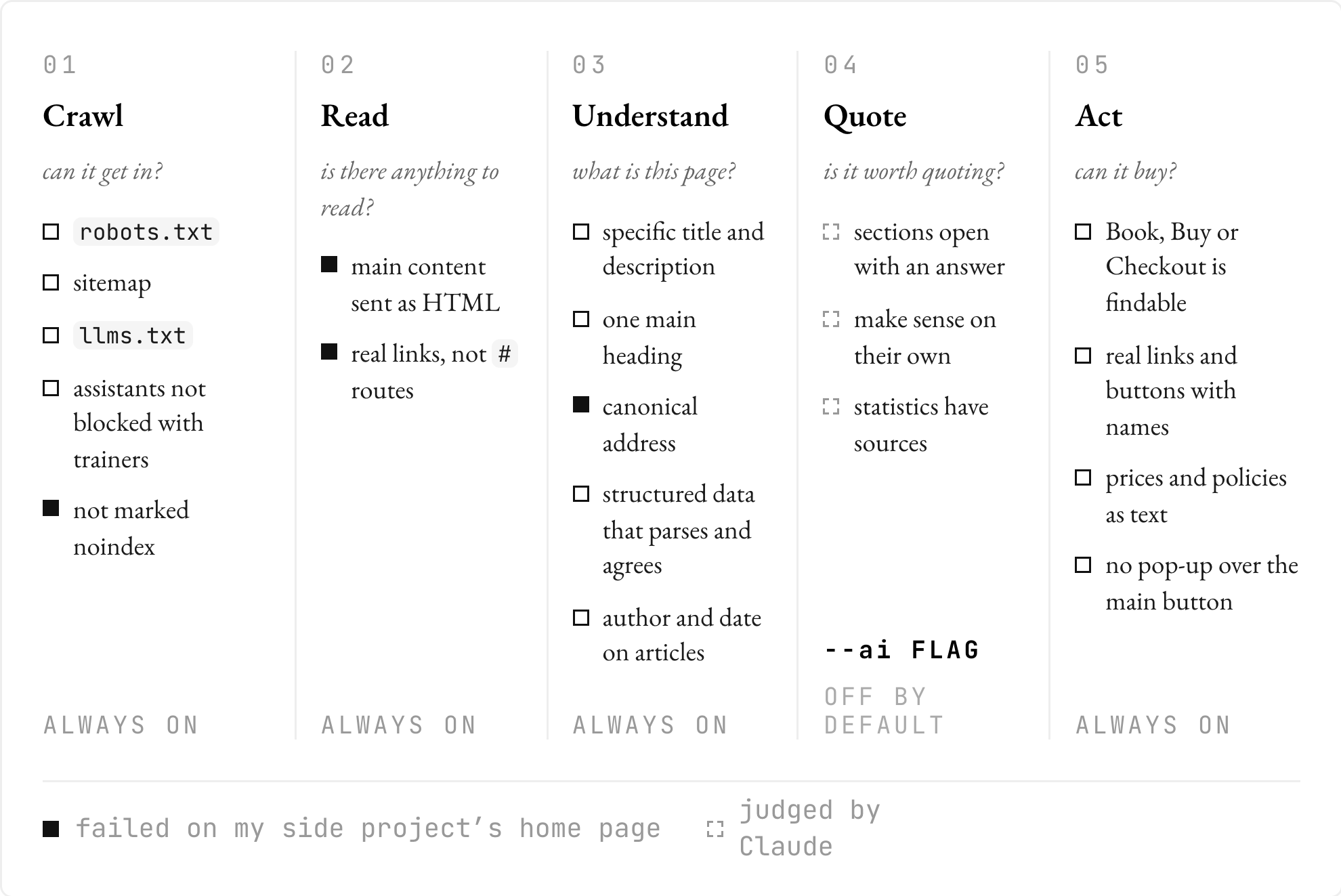
Fig. 2 — What gets checked at each step
The first checks are whether the assistant can get in and read anything. That means looking at robots.txt, the sitemap, an llms.txt file, and whether the server sends the main content as HTML. My single-page app failed that last one: the content appeared after JavaScript ran, which plenty of assistants never do.
You can stop AI companies using your website to train their AI while still letting assistants read it to answer customers’ questions. The checker flags when you’ve accidentally blocked those assistants too.
Then come the things that help an assistant understand the page: a specific title and description, one main heading, a canonical address, structured data that parses and agrees with what’s visible, and an author and date on articles. The canonical check is what caught my 26 share pages.
The quoting checks need more care. A missing title is straightforward to detect. Deciding whether a passage answers a question well enough to quote involves judgement. Those checks sit behind an optional --ai flag that asks Claude; they’re off by default. They look at things like whether a section opens with an answer, whether it makes sense on its own, and whether statistics have sources.
Finally, there are the agent-readiness checks. Can the assistant identify “Book”, “Buy” or “Checkout”? Are those controls real links or buttons with readable names? Are prices and policies available as text? Is a pop-up sitting in front of the main button when the page loads?
Every assistant understood the hotel’s cancellation policy because somebody had written it down clearly. I wanted the checker to find the places where the rest of the site hadn’t received the same treatment.
Remembering it on the next deploy
A one-off audit gives you another list to work through. I wanted the check to keep running as the site changed.
In the terminal, each finding includes the file and line, why it matters, and how to fix it, along with scores per page and overall.
The GitHub Action puts findings on the pull request and posts a summary. You can have it fail the build on errors, so a later change gets checked too.
There’s also a Claude Code skill that runs the checker, fixes what it can, and runs it again. That’s useful for the small changes Larne was talking about: the checker points to the problem, Claude makes the change, and another run checks whether it’s still there.
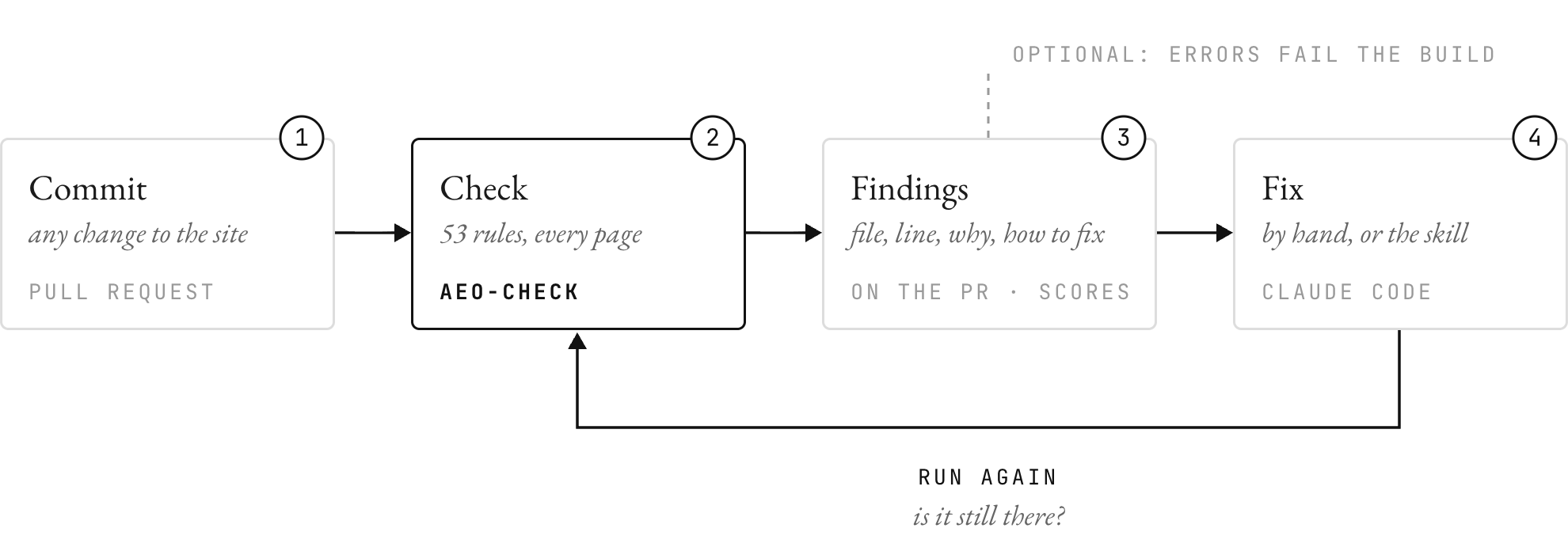
Fig. 3 — From a commit to findings, fixes and another check
It works with plain HTML, Next.js, React, Vue, Svelte, Astro and Markdown. You can also point it at a live URL instead of a project folder.
Where it is now
It’s on GitHub as AEO Checker, MIT licensed. You can run it in a project with npx github:pchewlo/aeo-check, or do what I do with most repos: paste the link into Claude Code and ask it to set it up.
If you’ve been building small sites with AI, I’d run it on one of them. Mine had 26 share pages all claiming to be the home page. Not good.
Shout-outs
Article
- Larne, “Agents don’t read your brand book”, Getting CEOs to trust CMOs, October 2026.
X posts the rules cite
- @Jingg_n_Tonic on answering within each section, using plain text, and putting claims beside evidence.
- @Kasra_Dash on getting cited for 5,000+ phrases by writing for each AI’s query fan-outs.
- @mal_shaik on Amplitude getting cited more than PostHog with pages that answer the problem.
- @RobHoffman_ on the 5–20 pages that drive conversions and linking them together.
- @LottiSchmitt on deleting 200 thin AI posts and tripling traffic.
- @danielkbuilds on content quality being a common reason pages aren’t indexed.
- @suraj_sharma14 on an SEO checklist for vibe-coded sites.
- @boringlocalseo on recent, structured content with comparison tables.
- @codyschneider on bottom-of-funnel pages refreshed every 30 days.
- @codyschneider on Claude Code for SEO: schema, internal links and content refreshes.
- @ericciarla on an
llms.txtgenerator. - @RoundtableSpace on an agent skills list including
claude-seo.